
 Image 1 of 1
Overview
The VStreamerMediaMtx C++ library provides RTSP, WebRTC, SRT (optional, not tested in version 2.1.0), RTMP, HLS video streaming and direct RTP streaming without audio. The library enables multiple video streams (different protocols simultaneously) compatible with all popular video clients. The library is based on the mediamtx video proxy server (run as an external process by the library). The library provides all necessary capabilities for video streaming devices: one video source → one/multiple video streams (RTSP, WebRTC, SRT, RTMP, HLS, direct RTP), multiple video sources → multiple video streams with different protocols. Work principle: the user feeds each video frame (frame-by-frame) in RAW or compressed format to the library, the library resizes the video and applies video overlay (if VOverlay implementation is provided by the user), encodes and then streams video to the mediamtx process with RTP protocol, the mediamtx process receives RTP streams and creates several streams with different protocols (RTSP, WebRTC, SRT, RTMP, HLS). Additionally, the library supports direct RTP streaming to a user-specified IP and port, bypassing mediamtx for low-latency unicast scenarios. The library will stream video frames as-is in the case of H264, HEVC or JPEG input frames. If the user provides RAW frames (not encoded), a VCodec implementation must be provided to the initVStreamer(…) method for video encoding. The library runs an external mediamtx process and restarts it when changing parameters. The library allows users to create multiple streams from different cameras. When the user creates multiple instances of the VStreamerMediaMtx C++ class, only one mediamtx process will be run. The library provides a simple interface and supports different platforms (x86, ARM, etc.). To support video encoding on a particular platform, the user must provide a video codec implementation according to the VCodec interface. The library provides easy integration of mediamtx server capabilities into C++ code. It is compatible with Linux operating systems only.
The library inherits its interface from VStreamer, mediamtx (provides video server, run as an external process, binary files included in code, will be embedded into library file, MIT license), cmrc (CMakeRC - A Standalone CMake-Based C++ Resource Compiler, cmake file to include mediamtx binaries into the library, MIT license), VCodec (defines video codec interface, source code included, Apache 2.0 license), VOverlay (defines video overlay interface, source code included, Apache 2.0 license), FormatConverter (provides methods to convert pixel formats, source code included), ChildProcess (provides functions to run child processes, source code included), RtpPusher (provides RTP pushing function to mediamtx process, source code included), ImageResizer (provides image resize function, source code included) and Logger (provides logging functions, source code included).
The library supports all necessary video streaming parameters. Additionally, mediamtx has a config file which includes many additional parameters that can be changed if necessary. The library works frame-by-frame and accepts video frames in the following formats: RGB24, BGR24, YUYV, UYVY, GRAY, YUV24, NV12, NV21, YU12, YV12, H264 (video resize and overlay not supported), HEVC (video resize and overlay not supported) and JPEG (video resize and overlay not supported). The following figure shows the workflow inside the library:
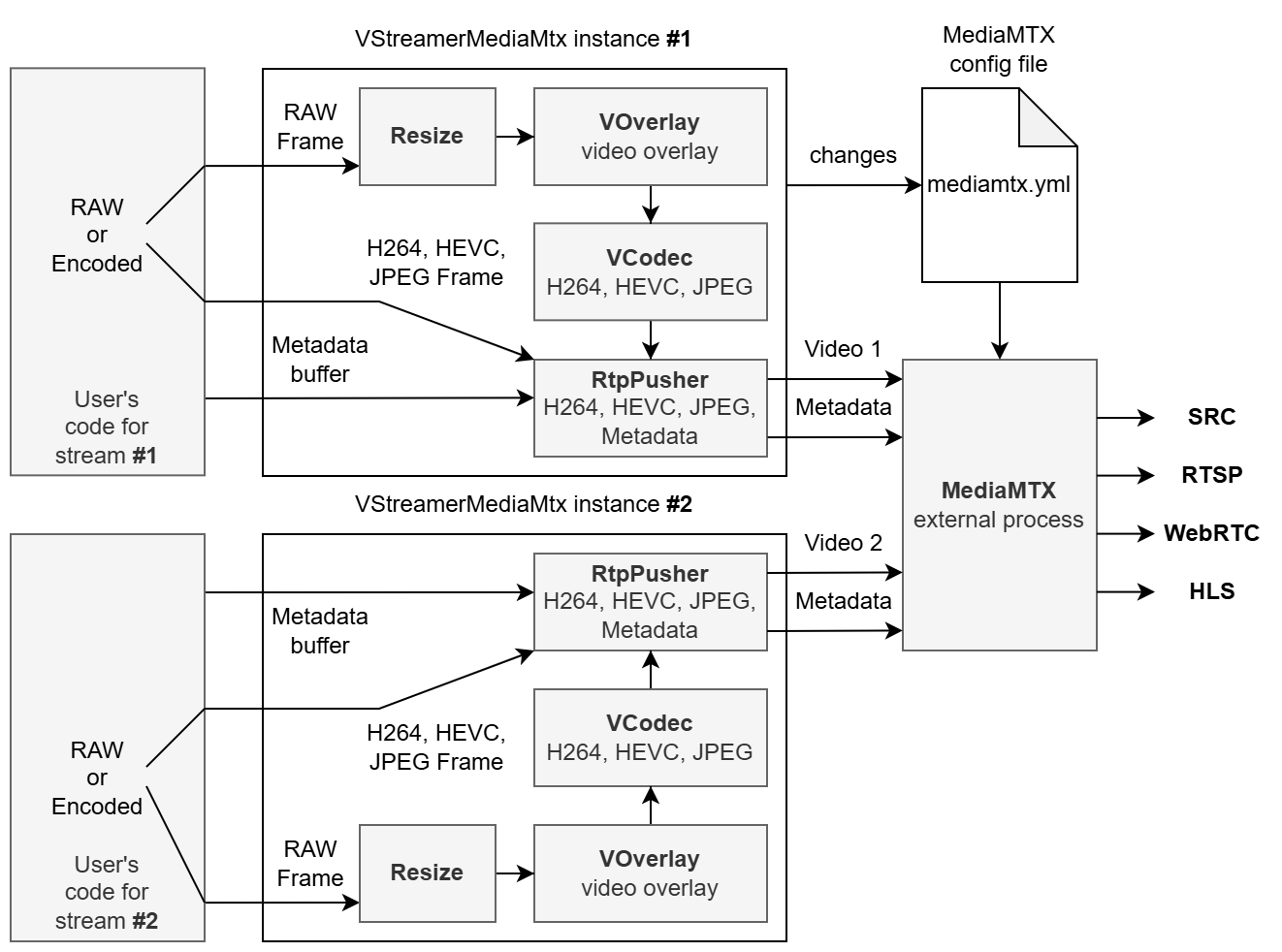
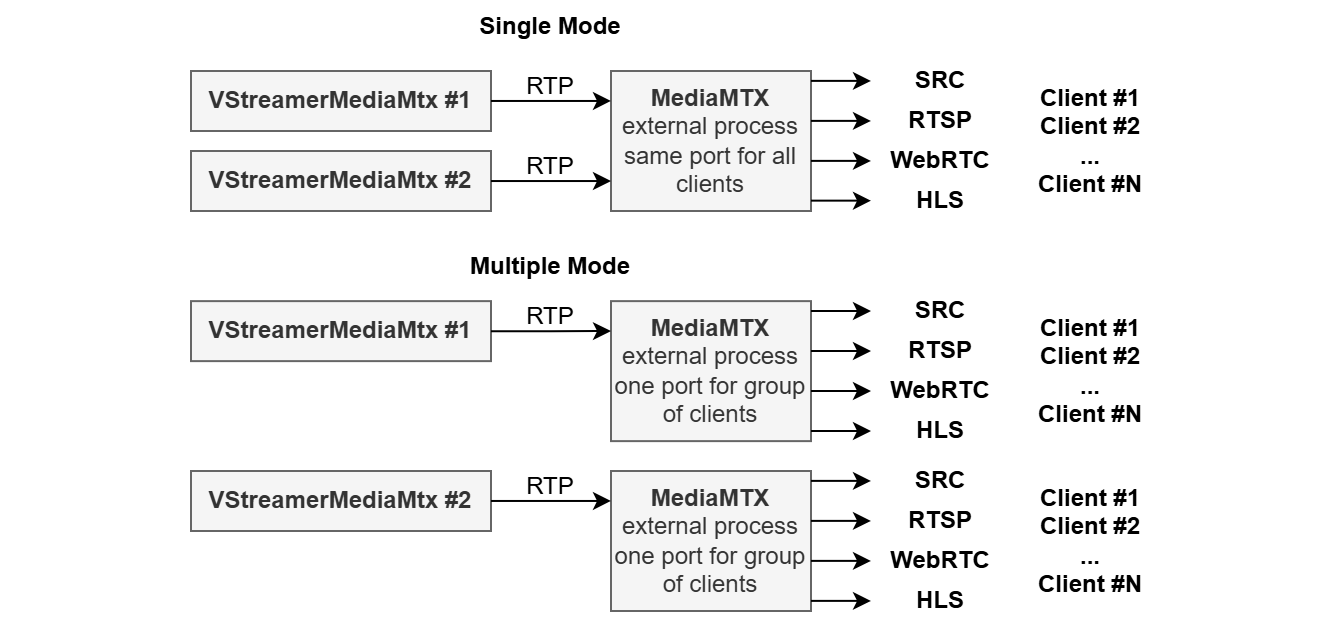
The user must provide the path to the mediamtx executable file (files for different platforms are included in the repository). The library reads the config file, runs the mediamtx external process, and controls it (restarting if necessary to implement necessary parameters). By default, the library runs only one mediamtx process (single mode), but some RTSP clients require a unique strict multicast IP address for each video stream which is not supported by mediamtx. To provide necessary functionality, the library can work in multiple mode (run several mediamtx processes). In case of single mediamtx process mode, all instances of the VStreamerMediaMtx class use the same port for all video streams for external clients. If the user changes one of these parameters in one instance, all other VStreamerMediaMtx instances in the user application will be restarted automatically with new parameters. The mediamtx process provides an RTSP server on the same port for all streams (difference only in stream name). For example: rtsp://127.0.0.1:7031/Camera1Stream1 (first instance of VStreamerMediaMtx), rtsp://127.0.0.1:7031/Camera1Stream2 (second instance of VStreamerMediaMtx), etc. In case of multiple mediamtx process mode, each instance of the VStreamerMediaMtx class uses its own port for external clients. If the user changes one of these parameters in one instance, only this instance will be restarted automatically with new parameters. The library provides automatic mediamtx configuration (creates config file) if the user provides a path to the mediamtx executable file. If the user doesn’t provide a path to the mediamtx executable file, the necessary parameters must be changed in the mediamtx configuration file (mediamtx.yml). To change any of them, the user must stop the mediamtx process, change the mediamtx.yml file, and run the mediamtx process again. The following figure shows the main difference between single mediamtx process mode and multiple mediamtx process mode:
Documentation
Documentation: GO TO DOCUMENTATION
Simple interface
namespace cr
{
namespace video
{
/// Video streamer.
class VStreamerMediaMtx : public cr::video::VStreamer
{
public:
/// Get string of current library version.
static std::string getVersion();
/// Class destructor.
~VStreamerMediaMtx();
/// Init video streamer by set of parameters.
bool initVStreamer(cr::video::VStreamerParams ¶ms,
cr::video::VCodec *codec = nullptr,
cr::video::VOverlay *overlay = nullptr) override;
/// Get init status.
bool isVStreamerInit() override;
/// Close video streamer.
void closeVStreamer() override;
/// Send frame to video streamer.
bool sendFrame(cr::video::Frame& frame, uint8_t* userData = nullptr, int userDataSize = 0) override;
/// Set video streamer parameter.
bool setParam(cr::video::VStreamerParam id, float value) override;
/// Set video streamer parameter.
bool setParam(cr::video::VStreamerParam id, std::string value) override;
/// Get all video streamer parameters.
void getParams(cr::video::VStreamerParams& params) override;
/// Execute action command.
bool executeCommand(cr::video::VStreamerCommand id) override;
/// Set media mtx path.
static void setMediaMtxPath(std::string path, bool isSingleMediaMTX = true);
};
}
}
Simple example
#include <iostream>
#include <chrono>
#include <opencv2/opencv.hpp>
#include "VStreamerMediaMtx.h"

int main(int argc, char **argv)
{
    // Set suffix (stream name).
    std::string suffix = "live";
    std::cout << "Set suffix: ";
    std::cin >> suffix;

    // Set RTSP server port.
    int port = 8554;
    std::cout << "Set RTSP server port: ";
    std::cin >> port;

    // Set mediamtx path
    cr::video::VStreamerMediaMtx::setMediaMtxPath("/home/ahmet/Projects/");

    // Init video streamer params.
    cr::video::VStreamerParams params;
    params.enable = true;
    params.width = 640;
    params.height = 480;
    params.fps = 30.0f;
    params.bitrateKbps = 7000;
    params.gop = 30;
    params.port = port;
    params.codec = "H264";
    params.h264Profile = 1;
    params.jpegQuality = 58;
    params.custom1 = 0.0f;  // 0 - Software, 1 - Intel hardware, 2 - Jetson hardware

    cr::video::VStreamerMediaMtx streamer;
    if (!streamer.initVStreamer(params))
    {
        std::cout << "Video streamer init failed" << std::endl;
        return -1;
    }

    // Create frame.
    cr::video::Frame frame =
    cr::video::Frame(params.width, params.height, cr::video::Fourcc::YUV24);

    // Moving object parameters.
    int objectX = 200;
    int objectY = 200;
    int objectVx = 1;
    int objectVy = 1;
    int border = 100;
    int objectSize = 50;
    uint8_t color = 0;

    // Main loop.
    while (true)
    {
        // Move object.
        objectX += objectVx;
        objectY += objectVy;
        if (objectX < border || objectX > params.width - border - objectSize)
            objectVx = -objectVx;
        if (objectY < border || objectY > params.height - border - objectSize)
            objectVy = -objectVy;

        // Draw object.
        memset(frame.data, color++, frame.size);
        cv::Mat image(params.height, params.width, CV_8UC3, frame.data);
        cv::rectangle(image, cv::Rect(objectX, objectY, objectSize, objectSize),
                      cv::Scalar(0, 0, 255), -1);

        // Add frame to streamer.
        if (!streamer.sendFrame(frame))
        {
            std::cout << "Send frame failed" << std::endl;
            break;
        }

        std::this_thread::sleep_for(std::chrono::milliseconds(30));
    }

    return 0;
}